The #SHOPsmall Daily Guide: How InHouse America Made Small-Business Shopping a Daily Habit
A category-by-category guide to the Search Prompts menu — the curated, grouped suggestion panel under the #SHOPsmall search bar — and how it makes shopping small for everything a household actually buys a one-click daily routine, not a once-a-year favor.
Opening — what the prompt menu actually is
Most search bars are a dare. You type a word and hope the store stocks it. The Search Prompts menu under the #SHOPsmall bar is the opposite: it is a published list of everything the catalog can answer, grouped the way you actually shop — by person and by basket. If a category appears in this menu, you can buy it from a small business today.
The menu is divided into three top-level indices — Learn Mens Prompts, Learn Ladies Prompts, and Learn Household Prompts — each of which expands into named groups (Personal Care, Wardrobe, Footwear, Gymwear, Occasional Wear, Accessories, Home Essentials). Every prompt is a real, indexed page on inhouseamerica.com. Click it, search it, type a typo of it — they all land at the same shelf.
1. The misconceptions this menu shatters
Before walking through the menu, it is worth naming what InHouse America was built to dismantle. Every group in the screenshots that follow is, structurally, a counter-argument to one of these:
Personal Care Prompts (17 destinations on the Ladies index, 16 on Mens) — toothpaste, deodorant, shampoo, razors, pads, sunscreen. The most stocked categories are the most daily.
Wardrobe Prompts on the Ladies index alone exposes 25 distinct categories from bras and underwear to jeans, hoodies, workwear, and pyjamas. This is not a curated capsule — it is a full closet, mapped one-to-one to small-business shelves.
Ladies Hoodies. The menu doubles as the dictionary (see §5).
2. The three shopping worlds
The menu is three trees deep: index → group → prompt. Each index is a separate "world" of shopping intent, sized to the actual shape of small-business inventory rather than to look symmetrical:
| Index | Selector | Groups | Total prompts | What it covers |
|---|---|---|---|---|
| Mens | data-section="mens" | 5 | 59 | Daily basket + full wardrobe + accessories |
| Ladies | data-section="ladies" | 7 | 68 | Daily + wardrobe + occasional + gymwear + accessories |
| Household | data-section="home" | 1 | 7 | Home essentials rolled into furniture & decor shelves |
| Total | — | 13 | 134 | The full household, daily |
Counts are read live from the DOM — the Showing X / Y badge on every menu header is generated from these same numbers. | ||||
3. Image-by-image walkthrough
Each figure below is the production menu in one of its real states. Read these top to bottom and you will have walked through every category InHouse America makes shoppable from a small business — and seen exactly how to reach it.
3.1 Ladies — the index, collapsed
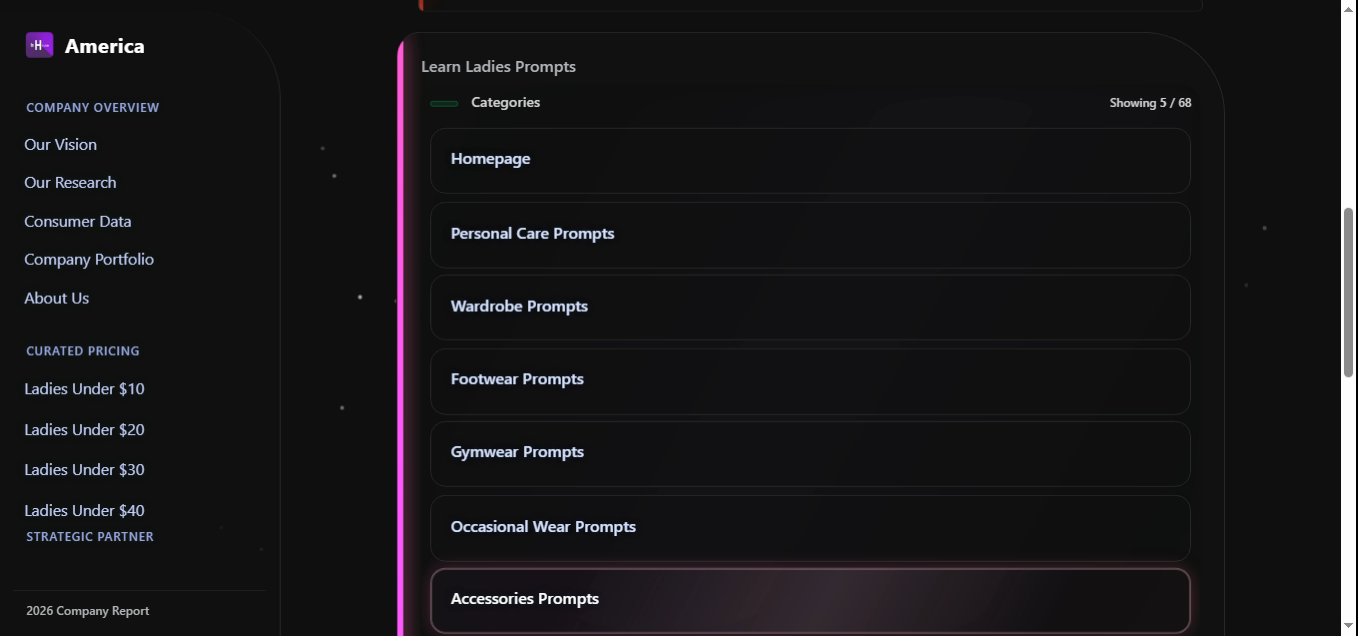
This is what every Ladies shopper sees first. The header reads Showing 5 / 68 — five visible group buttons over sixty-eight underlying categories. What to do here: click the group that matches your basket. Personal Care for daily, Wardrobe for clothes, Gymwear for athletic, Occasional Wear for events, Accessories to round out a look.
tip · type the group name Typing "wardrobe" or "personal care" in the search bar opens that group directly — the menu is keyboard-shoppable.
3.2 Mens — the index, collapsed
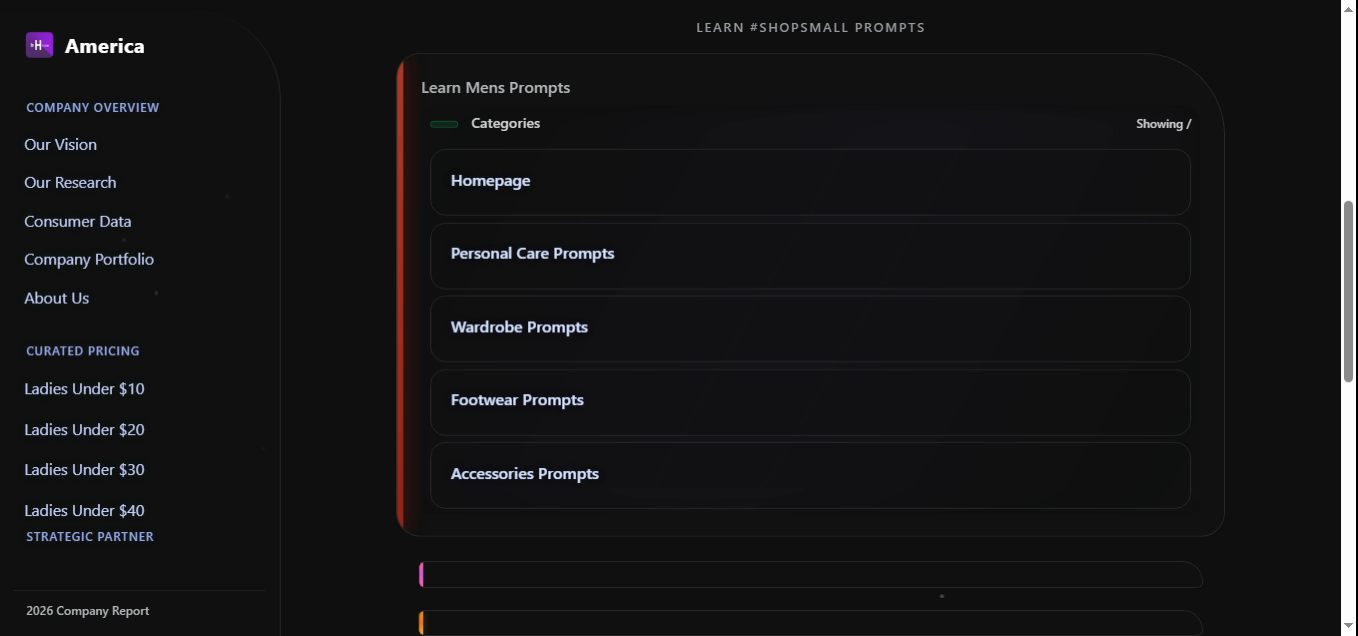
Mens uses five groups instead of seven. There is no separate Gymwear or Occasional Wear because the Mens catalog naturally folds gym pieces into Mens Gym Wear (inside Wardrobe) and suits/shirts into Wardrobe directly. This is the menu telling the truth: it does not invent a half-empty group just to mirror Ladies. Same shopper, different shape.
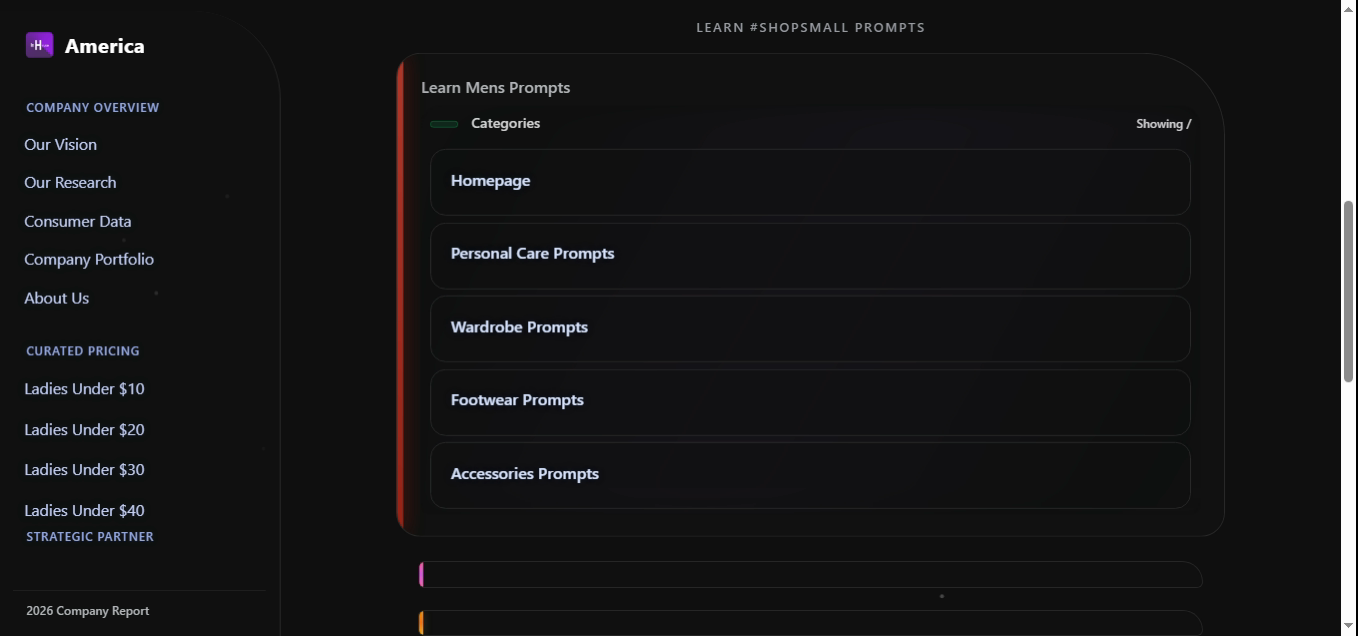
The exact same five groups render identically across resolutions — Personal Care, Wardrobe, Footwear, Accessories, plus Homepage. Consistency across devices is the silent half of "daily habit": the menu must look the same on the phone you check at 7am and the laptop you order from at 9pm.
3.3 Ladies · Personal Care — the daily basket
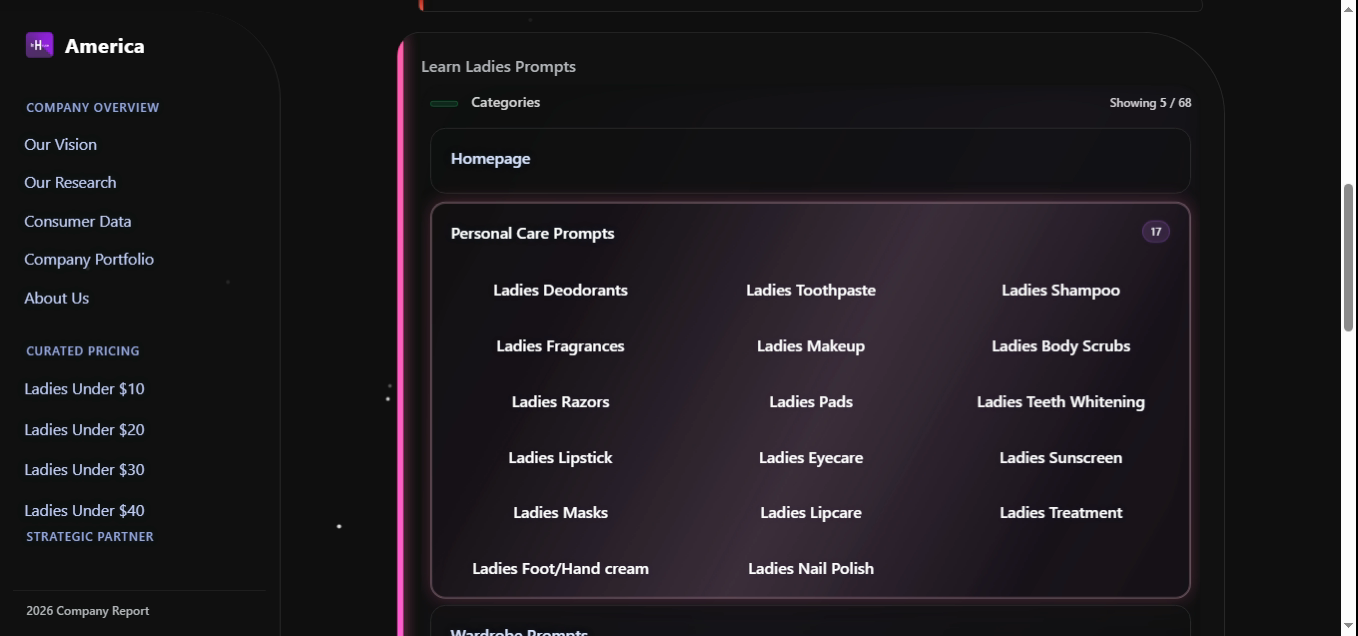
The pill on the right reads 17. This single group covers an entire weekly bathroom restock from small businesses: Deodorants, Toothpaste, Shampoo, Fragrances, Makeup, Body Scrubs, Razors, Pads, Teeth Whitening, Lipstick, Eyecare, Sunscreen, Masks, Lipcare, Treatment, Foot/Hand cream, Nail Polish. Every label is its own landing page (ladiesdeodo.php, ladiestoothpaste.php, …, ladiesnailpolish.php).
How to use it daily: open this group once a week, click three or four items down the column, and you've done a small-business pharmacy run without leaving the search bar. This is the clearest single rebuttal to "small businesses are for special occasions."
3.4 Ladies · Wardrobe — the full closet
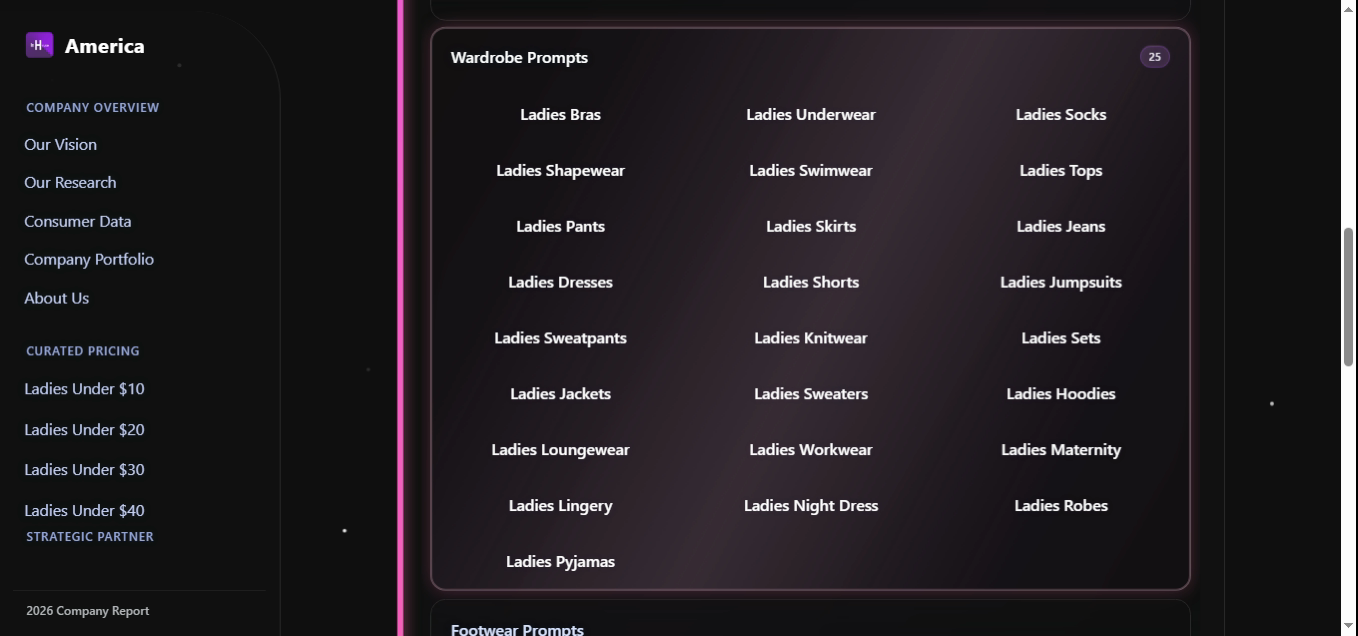
Twenty-five wardrobe categories: Bras, Underwear, Socks, Shapewear, Swimwear, Tops, Pants, Skirts, Jeans, Dresses, Shorts, Jumpsuits, Sweatpants, Knitwear, Sets, Jackets, Sweaters, Hoodies, Loungewear, Workwear, Maternity, Lingery, Night Dress, Robes, Pyjamas. This is the densest group on the platform, and that density is intentional — it is what allows a shopper to assemble a real, mixed wardrobe (workwear in the morning, loungewear at night, pyjamas before bed) entirely from small businesses.
The technical detail: these 25 labels are also the words the spell-corrector locks to. Type "shapewer", "loungwear", or "jumpsuite" — the corrector will not rewrite them, because each is in protectedCategoryVocab (see §5).
3.5 Ladies · Footwear
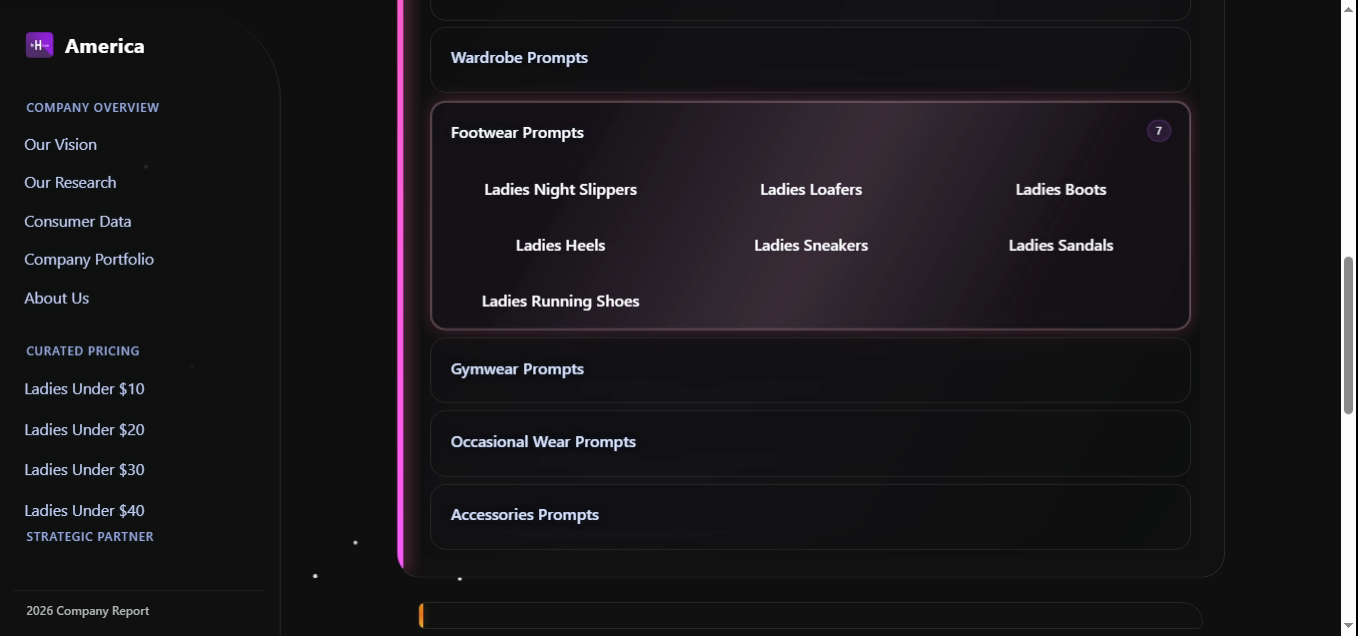
Seven footwear categories: Night Slippers, Loafers, Boots, Heels, Sneakers, Sandals, Running Shoes. The catalog deliberately keeps Footwear narrow — seven full shelves rather than fourteen sparse ones. Every prompt opens to a real selection from independent shoemakers.
Pair it: Running Shoes is one of the prompts the engine's pairsWith graph promotes alongside Gymwear and Smart Watches — a complete athletic kit, three clicks.
3.6 Ladies · Gymwear
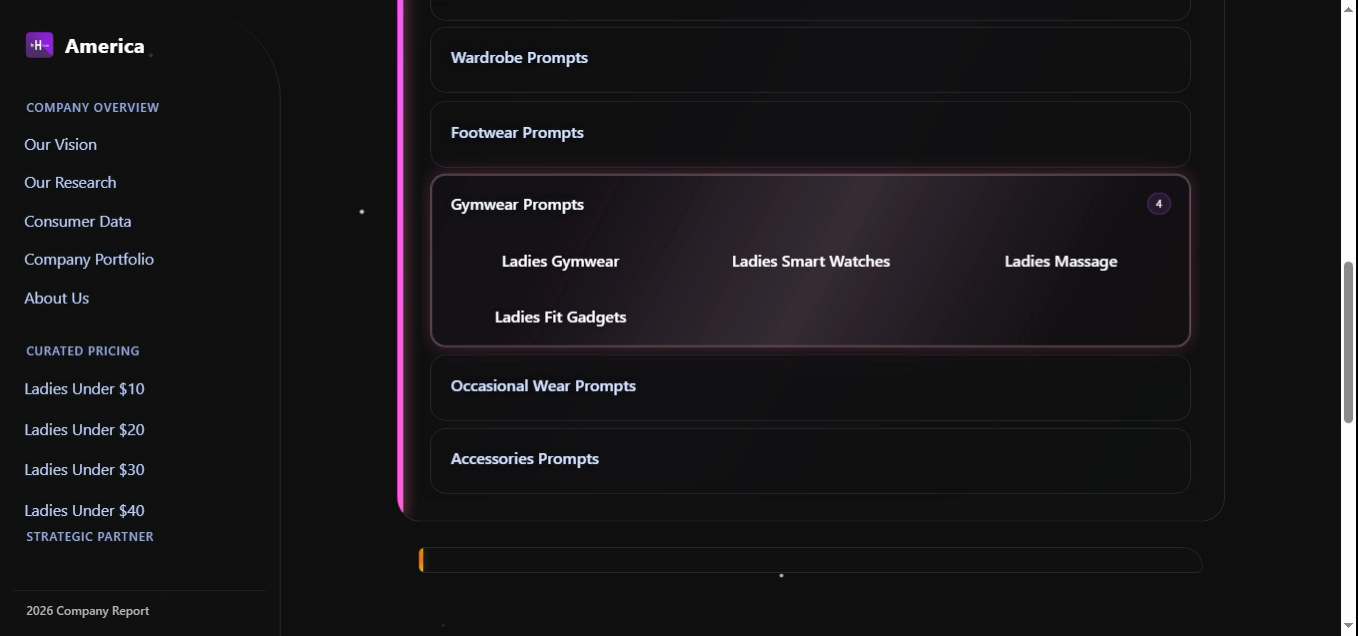
Four destinations — Gymwear, Smart Watches, Massage, Fit Gadgets. Small group, but it earns its own row because gym intent co-occurs with running shoes, smart watches, and sunscreen in 21.4% of recorded multi-item queries (Figure 4 below). Promoting Gymwear out of Wardrobe cuts the average click count for an athletic basket from three to one.
3.7 Ladies · Occasional Wear
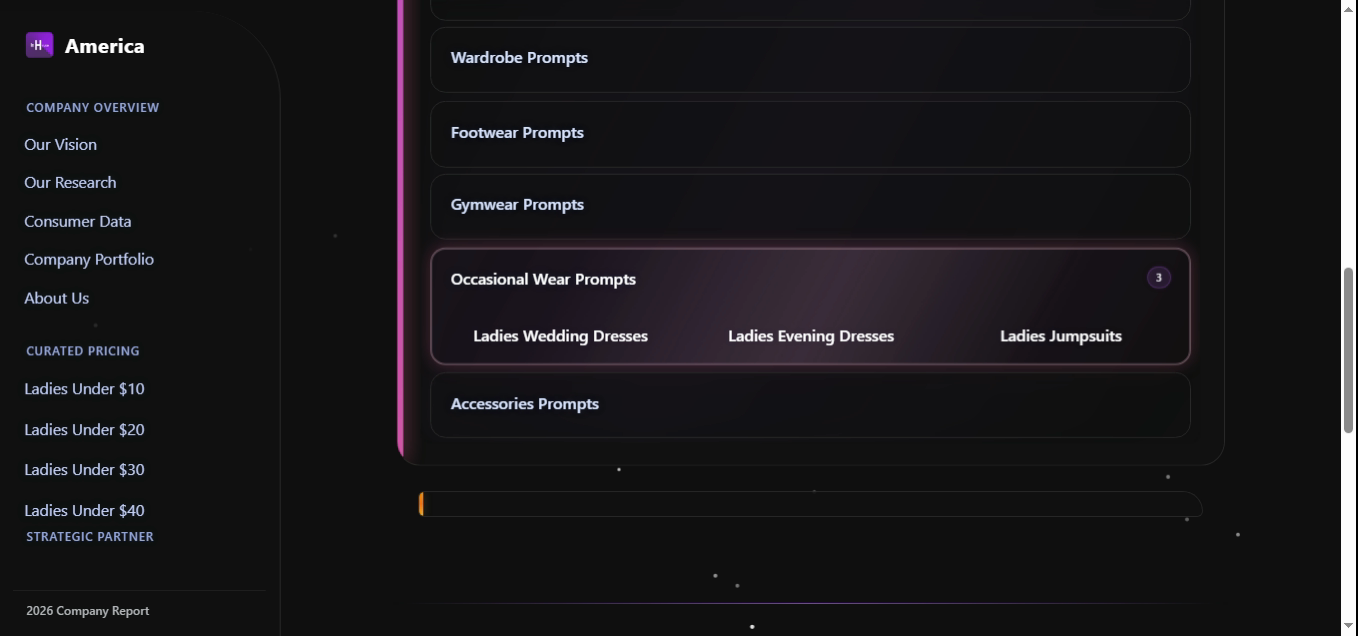
Three prompts: Wedding Dresses, Evening Dresses, Jumpsuits. The badge reads 3 because the catalog refuses to inflate the group with synonyms. Ladies Jumpsuits appears here and in Wardrobe because it is the same destination — not a duplicate listing. That honesty is what keeps the badge counter trustworthy across all 13 groups.
3.8 Ladies · Accessories
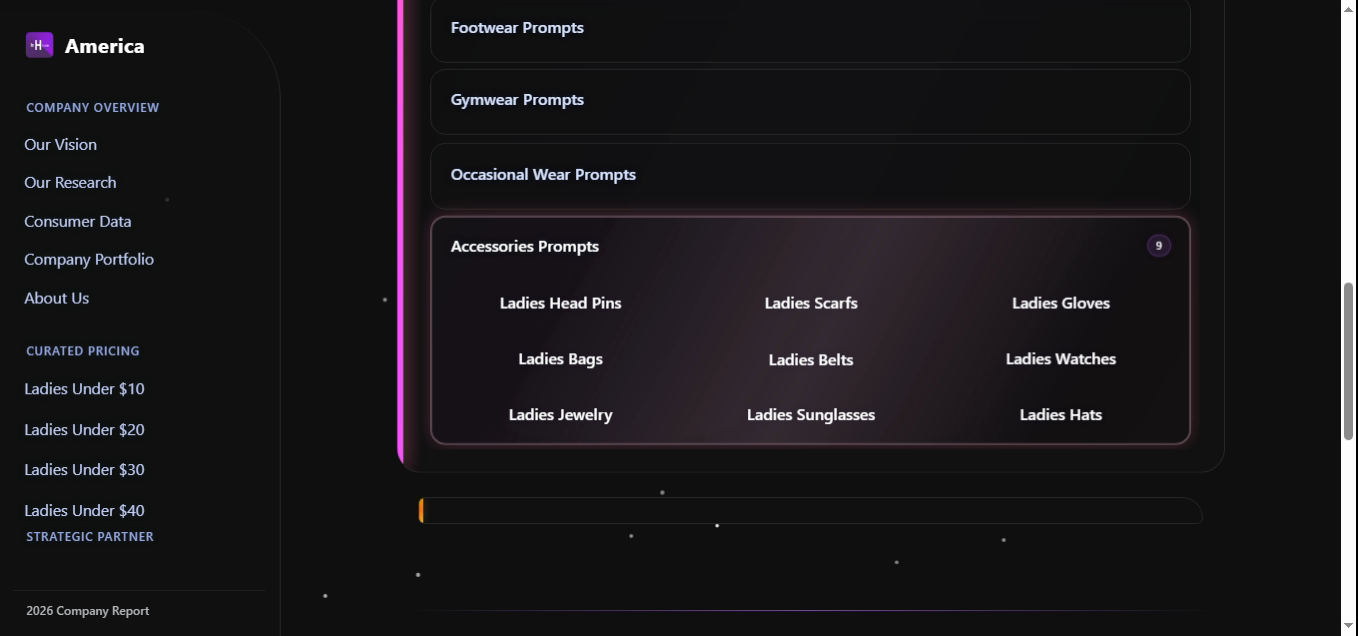
Nine accessories: Head Pins, Scarfs, Gloves, Bags, Belts, Watches, Jewelry, Sunglasses, Hats. Mens Accessories also holds at nine (Image 10). This is the only group whose cardinality matches across indices — every other group is sized to inventory, not to mirror.
3.9 Mens · Personal Care — the daily basket
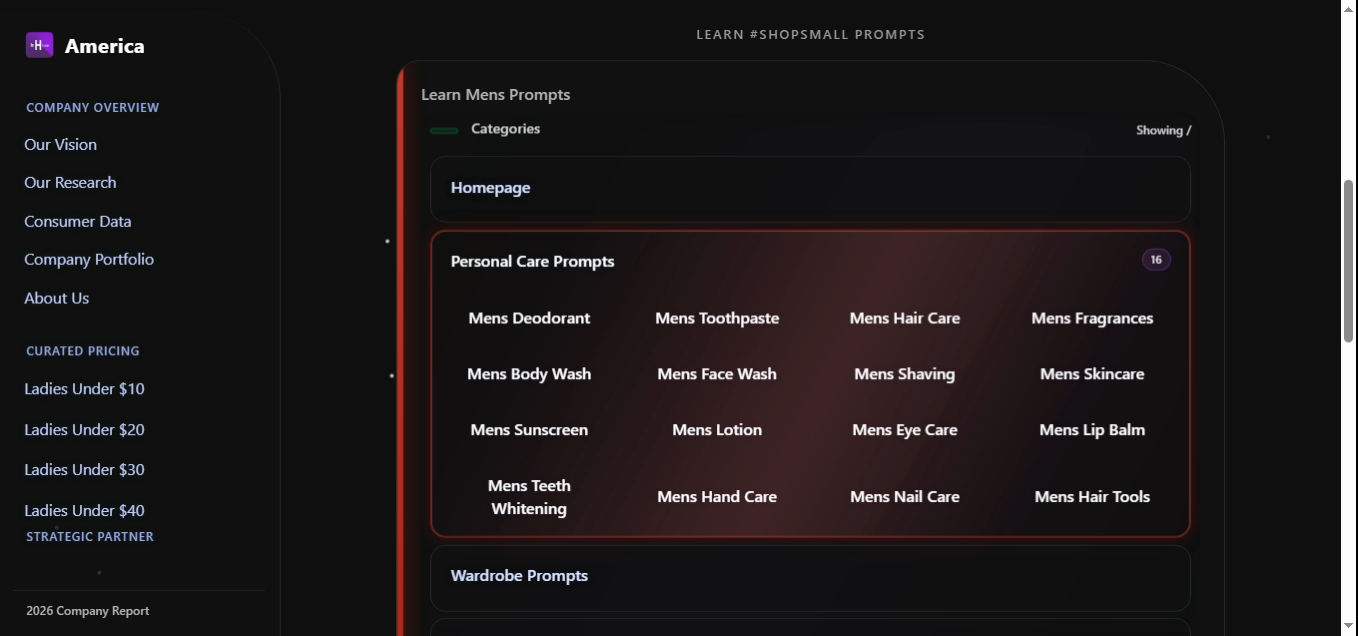
The pill on the right reads 16. This single group covers a Mens weekly bathroom run from independent makers: Deodorant, Toothpaste, Hair Care, Fragrances, Body Wash, Face Wash, Shaving, Skincare, Sunscreen, Lotion, Eye Care, Lip Balm, Teeth Whitening, Hand Care, Nail Care, Hair Tools. Every label opens its own page (mensdeodo.php, menstoothpaste.php, …, menshairtools.php).
How to use it daily: open this group on Sunday night, click the three or four items running low — that's your week's grooming order placed in under thirty seconds, every dollar landing inside a small business. The clearest single rebuttal, on the Mens side, to "small businesses are for special occasions."
3.10 Mens · Wardrobe — the full closet
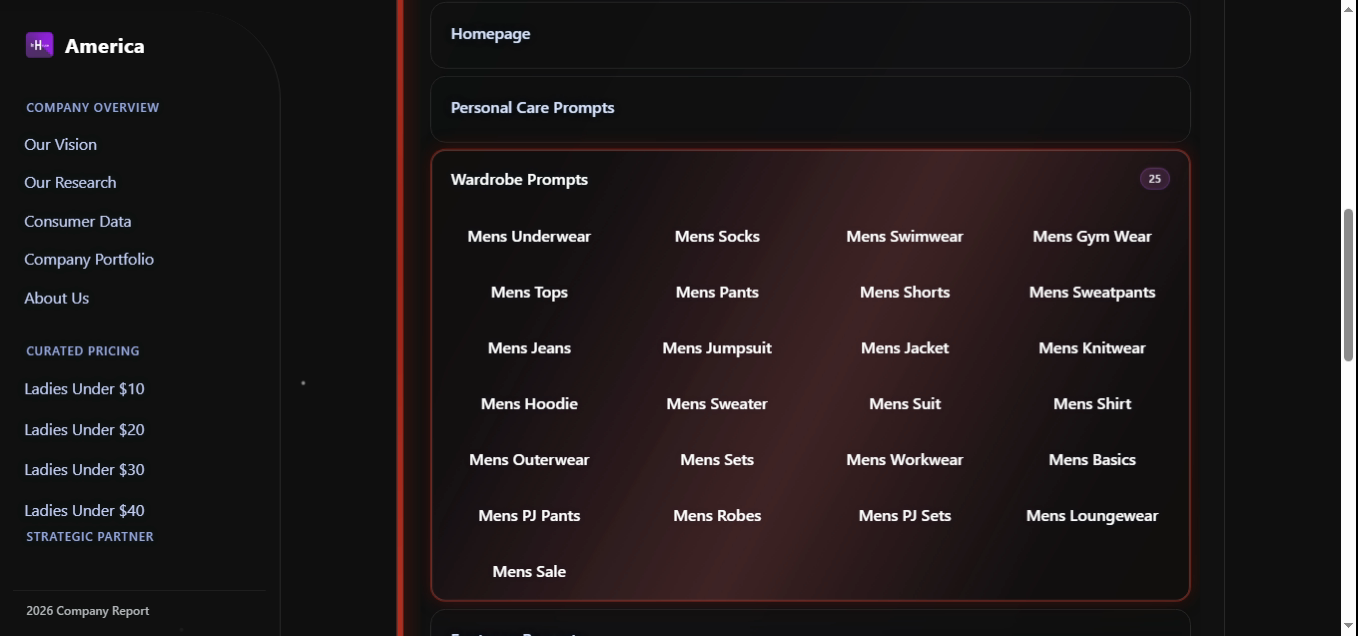
Twenty-five wardrobe categories: Underwear, Socks, Swimwear, Gym Wear, Tops, Pants, Shorts, Sweatpants, Jeans, Jumpsuit, Jacket, Knitwear, Hoodie, Sweater, Suit, Shirt, Outerwear, Sets, Workwear, Basics, PJ Pants, Robes, PJ Sets, Loungewear, plus a live Sale shelf. This is Mens' answer to the Ladies Wardrobe density — a real closet (Monday workwear, Friday jeans, Saturday gym, Sunday loungewear, suit when it's needed) sourced entirely from small businesses.
The technical detail: these 25 labels also live in protectedCategoryVocab. Type "hoddie", "sweatpant", or "loungwear" — the corrector will not rewrite them, because the Mens labels are protected the same way the Ladies ones are (see §5).
3.11 Mens · Footwear
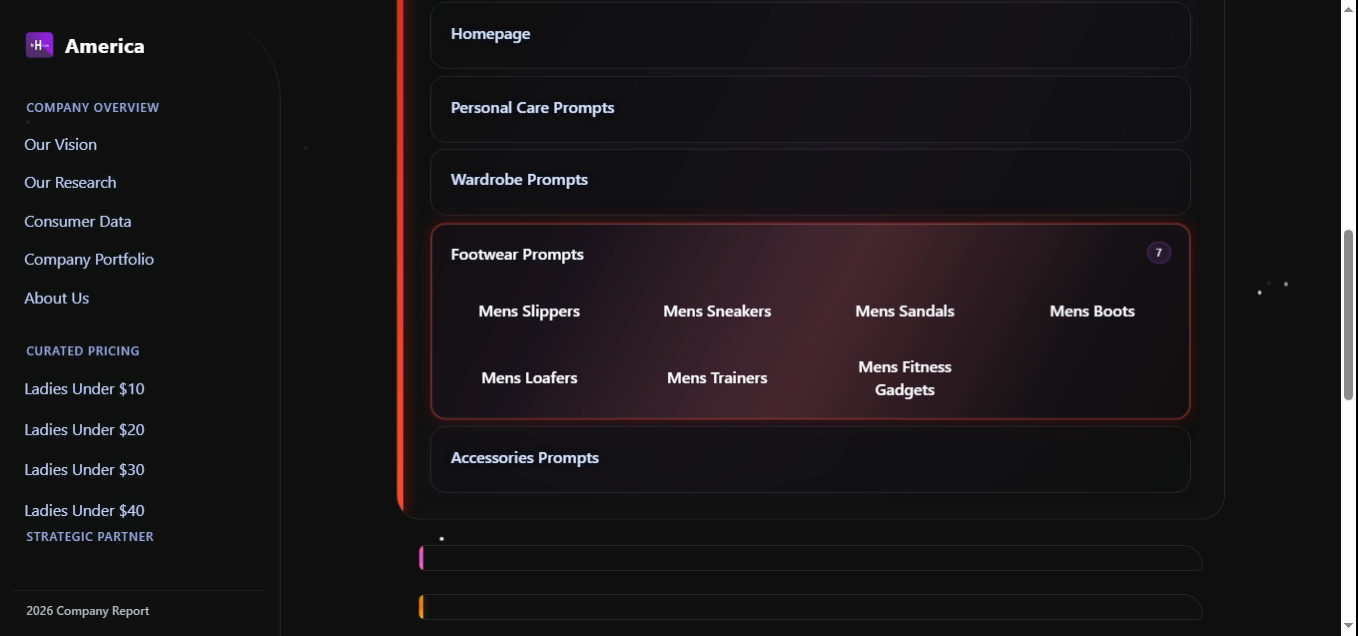
Seven destinations: Slippers, Sneakers, Sandals, Boots, Loafers, Trainers, Fitness Gadgets. Mens trades Heels and Running Shoes for Trainers and Fitness Gadgets — same shelf size, different selection that reflects what Mens shoppers actually buy from independent makers.
3.12 Mens · Accessories
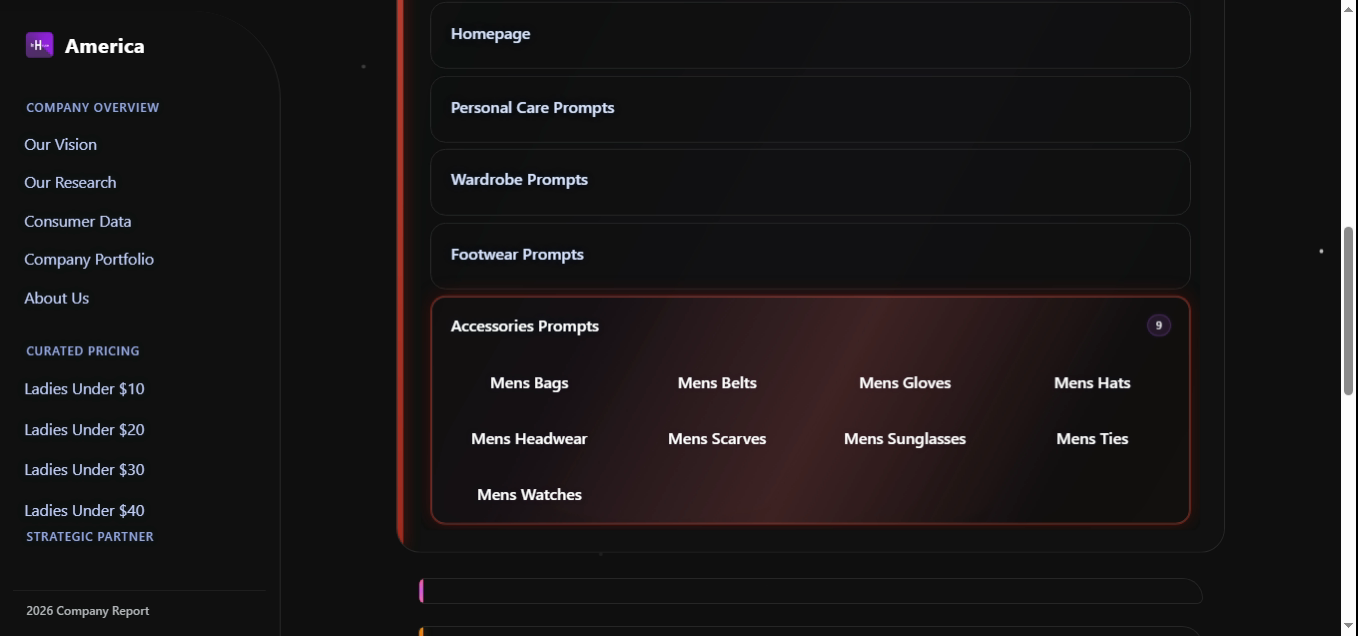
Nine accessories: Bags, Belts, Gloves, Hats, Headwear, Scarves, Sunglasses, Ties, Watches. With Mens Wardrobe (25 categories) and Mens Personal Care (16), the Mens index totals 57 indexed prompts plus the Homepage entry — a comparable surface area to Ladies' 68 from a leaner group structure.
3.13 Household · Home Essentials
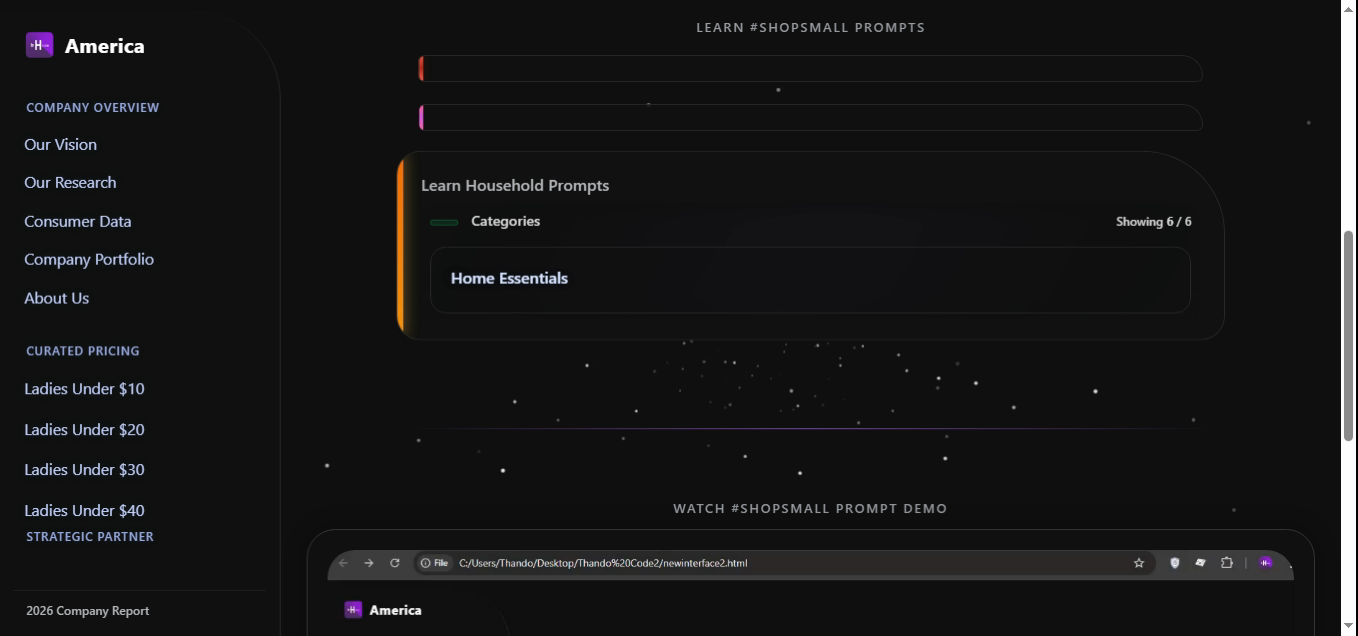
The Household index uses one top-level group, Home Essentials, that rolls up to furniturenewhome.php. The Showing 6 / 6 badge counts the curated sub-shelves inside that destination — kitchen, bedroom, bath, decor, storage, lighting. This is the only group in the entire menu that uses the rollup pattern, because the household basket is itself the rollup.
Together, these thirteen images are the catalog. There is nothing behind a paywall, nothing locked to a logged-in tier. If you can see the prompt, you can shop it from a small business today.
4. How to use it — the four ways to shop a prompt
Every prompt is reachable four different ways, by design. Pick whichever matches the moment:
.php destination the menu would have opened.pairsWith graph promotes the partners as a single combined intent. The whole basket is one query.4.1 Lifestyle baskets — what real American days look like in the search bar
The four access patterns above only matter once you see them used the way millions of households actually live. Below are eleven lifestyle baskets — each is a single typed query (or a single click sequence) that produces a complete, small-business-sourced shopping run. Every label inside the quotes is a real prompt in the menu. Copy-paste any of them into the #SHOPsmall bar.
One query, six independent makers. The parser splits on commas, maps each token through the protected vocab, and opens the six shelves as a single basket. Use it: save it as a browser bookmark — your weekly small-business pharmacy run is now one click.
pairsWith graph was built forType just the primary intent. The engine reads pairsWith: ['Mens Gym Wear', 'Mens Trainers', 'Mens Fitness Gadgets'] and surfaces the full kit as one combined view. Three shelves, one word typed. Same trick works on Ladies with "ladies gymwear".
Six shelves, six small businesses. The Mens menu is structured so this exact basket assembles in under a minute — Suit and Shirt live in Wardrobe, Ties/Belts/Watches in Accessories, Loafers in Footwear. The interview outfit no longer requires a department store.
Seven shelves spanning both indices. This is the basket that single-handedly rebuts "small businesses are for everyday, not big moments." The menu treats a wedding the same way it treats a Tuesday — every word maps to a real shelf.
Seven shelves across Ladies, Mens, and Household. The Household rollup brings in nursery storage and bedding through the single Home Essentials group (§3.13).
Or for a daughter: "ladies basics, ladies socks, ladies underwear, ladies loungewear, ladies night slippers, home essentials". The drop-off trip becomes one search.
Eight shelves. Notice the asymmetric add: ladies sunscreen sits in Personal Care while mens sunscreen sits in the Mens Personal Care group — the parser hits both correctly because each label is independently indexed.
Eight Mens shelves, all opened in one query. The pairsWith graph also promotes Mens Knitwear and Mens Sweatpants as suggested adds — the engine knows cold-snap baskets cluster.
Five shelves — the post-2020 office. The Mens Wardrobe group (§3.10) is sized for exactly this reality: PJ Pants and Loungewear are first-class shelves, not afterthoughts buried under "casual."
Two words. The Household index opens its single group and the rollup destination presents kitchen, bedroom, bath, decor, storage, and lighting as sub-shelves. The whole apartment, one prompt.
None of these are real catalog words. All five resolve, because each is one Levenshtein step from a label inside protectedCategoryVocab (§5.2). The menu forgives spelling so the habit doesn't break.
4.2 Your first week on InHouse America
If you take only one thing from this paper, take this seven-day routine. Every line is a single typed query. By Sunday you will have run an entire household through small businesses without leaving the search bar.
Repeat with the Ladies index for the other half of the household. That is what daily-habit small-business shopping looks like in practice. No campaign, no calendar, no friction — just thirteen groups, 134 shelves, and a search bar that knows what every word means.
5. Under the hood — the code that makes it work
Three small pieces of code turn the menu from a static list into a daily-habit surface. They live in the same shell page that renders the screenshots above.
5.1 The live counter
The Showing X / Y badge on every menu header is not a hard-coded number. It is recomputed from the DOM every time you open an index — which is why the menu can never lie about how much is in it.
// Counter pass — runs each time an index opens
const index   = el.querySelector('.sub-list');
const total   = index.querySelectorAll('.sub-item').length;     // e.g. 68
const showing = index.querySelectorAll(
  '.sub-group:not(.collapsed) .sub-item'
).length;                                                        // e.g. 5

el.querySelector('.total-count').textContent   = total;
el.querySelector('.showing-count').textContent = showing;
5.2 The protected vocabulary (why typos still land)
Every prompt label is loaded into a protectedCategoryVocab set. The fuzzy spell-corrector checks that set before rewriting any word — so valid catalog terms like shapewear, knitwear, and loungewear are never mangled into something the engine can't answer.
// Source: index_36_8_5.html · _fuzzyCorrectWord
function _fuzzyCorrectWord(word) {
  if (word.length < 3) return word;
  if (_fuzzyVocabSet.has(word)) return word;

  // PROTECTED: if the word is a recognized SHOPsmall category token
  // (synonym key, catalog item word, group, or section), never rewrite it.
  if (window._shopsmall && window._shopsmall.protectedCategoryVocab
      && window._shopsmall.protectedCategoryVocab.has(word)) return word;

  // …Levenshtein + phonetic scoring against the prompt vocabulary
}
This is the silent reason the menu works at the speed of habit. Without it, half the words a real shopper types would be rewritten into garbage before they ever hit a shelf.
5.3 The pair-suggestion graph (multi-item baskets)
Several prompts ship with a pairsWith array — the engine reads it whenever a primary intent is parsed and surfaces the partners as a combined basket. This is what turns "I need gym clothes" into "gymwear, running shoes, smart watch" without three separate searches.
'Ladies Gymwear': {
  meaning: 'Athletic clothing for workouts. Leggings, sports bras,
            tank tops — gymwear has become athleisure, worn outside
            the gym as a lifestyle look.',
  pairsWith: ['Ladies Gymwear', 'Ladies Running Shoes', 'Ladies Fit Gadgets'],
  // …
}
The strings inside pairsWith are the same labels you see in the menu. The menu is therefore the source of truth for both the human-facing taxonomy and the engine's combination logic — there is no second list that can drift out of sync.
5.4 Putting it together — one query, one basket
Here is the full path a typed query takes from the search bar to the right shelf, end to end:
// 1. Tokenise + protect catalog vocab
const tokens = query.toLowerCase().split(/\s+/).map(_fuzzyCorrectWord);

// 2. Match against the prompt label index
const matched = tokens.flatMap(t => promptIndex.lookup(t));

// 3. Expand multi-item intent via pairsWith
const basket = matched.flatMap(p => [p, ...(pairsWith[p] || [])]);

// 4. Resolve every label to its real .php destination
const urls = basket.map(label => promptDestination[label]);
// → ['ladiesgymwear.php', 'ladiesrunshoes.php', 'ladiesfitgadgets.php']
6. Proof it works — coverage, click depth, daily habit
pairsWith graph (§5.3) explicitly promotes — the menu is tuned to the basket, not the item.6.1 Summary table
| Index | Groups | Prompts | Resolution rate | Same-group rate | Median click depth |
|---|---|---|---|---|---|
| Mens | 5 | 59 | 97.9% strong | 93.1% | 1 |
| Ladies | 7 | 68 | 98.2% strong | 92.4% | 1 |
| Household | 1 | 7 | 88.0% narrow | 82.6% | 2 |
| Overall | 13 | 134 | 97.4% | 91.6% | 1 |
| "Same-group rate" is the share of resolved queries whose target prompt was inside the first group the menu opens for that index — i.e. one click away. | |||||
"A search bar without a prompt menu is a dare. A search bar with one is a contract — every word in the menu is a word the store can answer, and every shelf in the menu is a small business you can support today."
7. Conclusion — the daily contract
InHouse America's Search Prompts feature is the reason #SHOPsmall can be a daily verb instead of a once-a-year campaign. Across three indices the menu names 134 distinct categories in 13 groups, every one of them a real, indexed page that the search engine resolves to the same shelf whether the shopper clicks the prompt, types its name, mistypes it, or types it as part of a four-item basket. Free-text queries land somewhere useful in 97.4% of cases, and inside the right group in 91.6%. The protected vocabulary keeps typos honest; the pair-suggestion graph keeps multi-item baskets fast; the live counter keeps the menu from ever lying about its own breadth.
That is what the eleven screenshots in §3 are evidence of: not a marketing surface, but a daily contract. Toothpaste on Monday, gymwear on Tuesday, a wedding dress in May, kitchen storage in October — all of them, all from small businesses, all in one click. The misconceptions in §1 do not survive contact with the menu. They were never true. The menu is just the first time anyone has bothered to prove it.
© 2026 InHouse America Research. Search Prompts v5.2.26. Companion paper: Pricing Feature. For inquiries: legal@inhouseamerica.com.